


It's the digital equivalent of a busy signal. A potential customer in Waukesha or Eau Claire clicks your website link and… nothing. Maybe a spinning wheel. In 2026, the customer doesn't wait around. They hit "back" and go right to your competitor.
Website speed isn't a "tech thing" anymore. It is a fundamental business metric. If your website is slow, you are actively paying for traffic that leaves before they even see your logo.
The most common silent killer of lead generation campaigns isn't bad copy or an ugly design. It's a 4-second website load time. With their recently updated Core Web Vitals benchmarks, Google is now stricter than ever.
This guide is your no-nonsense manual to getting your website speed on the right track. We'll skip the developer jargon, and concentrate on what will actually bring you new customers.
Wisconsin's Reality: Why Website Speed Matters
You might think, "Everyone has 5G now, right?" Very wrong. Especially here in Wisconsin.
In 2026, Wisconsin ranks 45th in the nation for broadband coverage and 48th for Gigabit access. While downtown Milwaukee enjoys fast speeds, your customers in rural Dane County, Washington County, and up north are frequently browsing on spotty 4G and limited DSL connections.
Andrew's InsightWhen I test a partner's website, I don't just look at the desktop score on my office fiber. I throttle the connection to 4G Slow, to see what a customer in a parking lot is actually experiencing in real life. That's where the sale is won or lost.
If your website is built for Silicon Valley broadband speeds, then it's broken for Wisconsin reality. You need a site that flies, even on a two-bar signal.
Demystifying Core Web Vitals (The "Big Three")
Google uses a set of metrics called Core Web Vitals to measure the user experience of your website. These are now major search ranking factors in 2026. If you fail these, you will drop in search results.
Here is the simple translation:
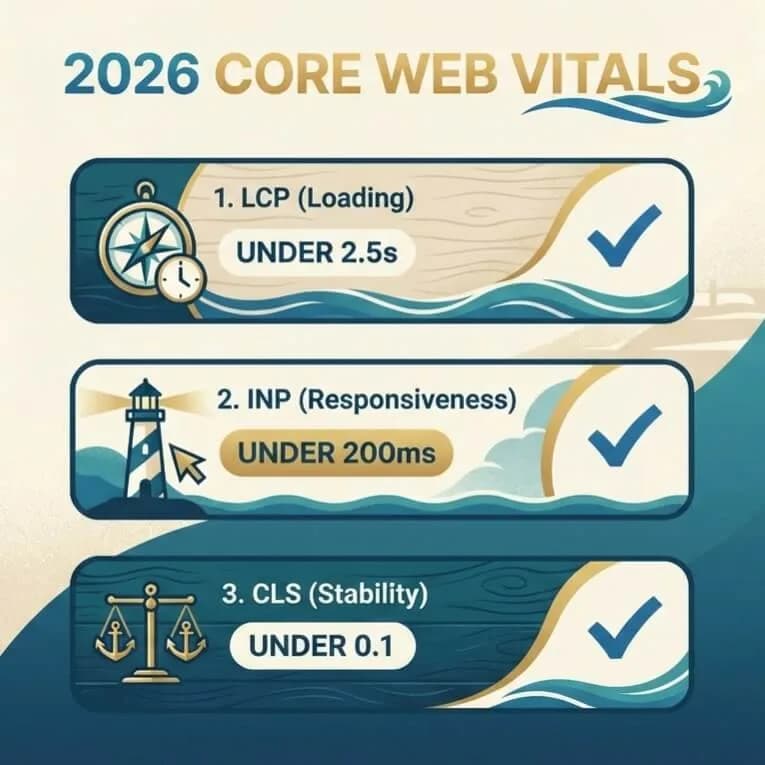
- LCP (Largest Contentful Paint) – Loading: How long does it take until the main content (usually the hero image or headline) is visible? Goal: Under 2.5 seconds.
- INP (Interaction to Next Paint) – Responsiveness: When a user clicks a menu or a button, how quickly does the site react? (This replaced FID in 2024 and is critical for mobile menus). Goal: Under 200 milliseconds.
- CLS (Cumulative Layout Shift) – Stability: Does the text jump around while you're trying to read it? Goal: Less than 0.1.
You don't need to be a coder to care about this. You just need to know if you're passing or failing.
The 3-Second Rule and Your Bottom Line
Why shoot for 2.5 seconds? Because user patience falls dramatically off a cliff after three seconds.
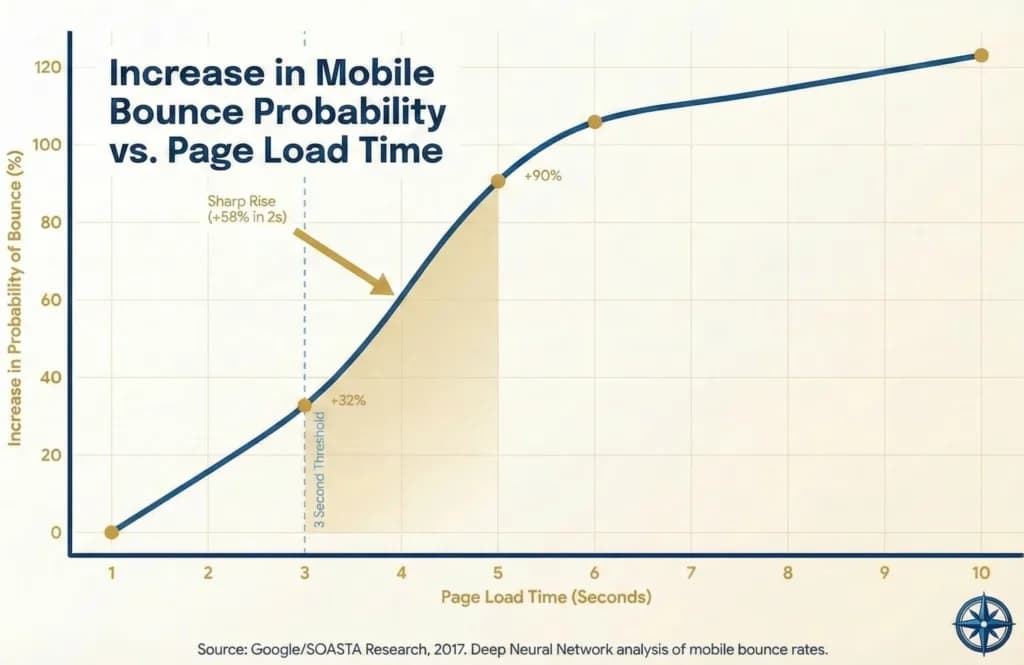
The data is brutal:
- 53% of mobile visits are abandoned if a site takes longer than 3 seconds to load, according to research from Google.
- A 1-second delay reduces conversions by 7%.
Do the math! If your website generates $10,000 a month, a delay of just one second could be costing you $700/month or $8,400/year in invisible lost revenue. Speed is not an expense, it's revenue protection.
How to Test Your Site (Andrew's Method)
Don't guess. Test with real tools. I use Google PageSpeed Insights. It's completely free, fast, and authoritative.
Be careful: There's no practical need to obsess over getting a perfect 100/100 score. That's really a vanity metric. I tell our partners to obsess over passing the Core Web Vitals Assessment at the top of the report. A score of 92 with passed vitals is better than a 99 that fails INP.
The 10-Minute Speed Checklist
Want to speed up your WordPress site right now? Here is your optimized checklist for 2026:
- 1Compress Your Images: This is the #1 culprit. If you are uploading 5MB photos to your site from your iPhone, stop now. Use a plugin or tool like TinyJPG to compress and convert them to WebP format.
- 2Get Real Hosting: Cheap $5/month shared hosting puts you on a crowded server. Upgrading to managed WordPress hosting, like WP Engine or Hostinger, is the single fastest way to improve your site's LCP.
- 3Use a Caching Plugin: Tools like LiteSpeed Cache and WP Rocket create static HTML versions of your pages, serving them instantly to visitors.
- 4Audit Your Plugins: Do you really need that snowy effect plugin from 2019? Every plugin adds code to your site. If it doesn't make you money, delete it.